
DEVELOPERS & TECHNICAL INTEGRATION

Turn Existing System Capabilities Into Governed AI Capabilities

Keep existing APIs and business systems unchanged. Nebula PLUS connects data, RESTful APIs, pages, Skills and Agents, then makes governed capabilities available to WorkBuddy, DeepSeekHarness and standard MCP clients.

View the Publishing Interface
  • Reuse Existing Systems
  • Unified MCP Service
  • Employee-level Access
  • Invocation Audit
AI ENTRY POINTSWorkBuddyDeepSeekHarnessStandard MCP Client
NEBULA PLUSAI SYSTEM CONNECTORIdentityPublishingAccessAudit
EXISTING RESOURCESDatabase / Read-only SQLBusiness APIsBusiness PagesSkillAgent
Identity · access · publishing · audit govern every invocation

PRODUCT CORE ARCHITECTURE

Connect Once. Let Multiple AI Entry Points Use Existing Systems Safely.

Nebula PLUS sits between AI work entry points and enterprise systems, connecting data, functions, pages and business skills while carrying identity, access, confirmation and audit through every invocation.

Connect Once. Let Multiple AI Entry Points Use Existing Systems Safely.Product architecture showing AI work entry points connected to existing business systems through Nebula PLUS under employee identity and accessAI ENTRYCONNECT & GOVERNCAPABILITIESSYSTEM RESOURCESAI WORK ENTRY POINTSWorkBuddyBusiness capability entryDeepSeekHarnessBusiness capability entryEnterprise AI AssistantBusiness capability entryStandard MCP ClientBusiness capability entry星云 PLUSAI System ConnectorConnectedIdentity MappingCapability AccessPermission ContextKey ConfirmationRuntime StatusInvocation AuditConnector AuthorizationSource-system Permission CheckRead-only SQLBusiness APIBusiness PageSkillAgentDatabaseRESTful APIExisting PageBusiness SkillBusiness AgentFor ERP, CRM, MES, WMS, OA and other existing systems

Existing systems stay unchanged. Employee accounts and permissions remain effective.

See How It Works

FIVE INTEGRATION METHODS

Start With the Resources Your Systems Already Have

Legacy systems do not need a complete API layer on day one. Start with a read-only query or an existing business page, then expand capabilities gradually.

01

Query Data

Database / SQL
Best for
Connect common and domestic databases for read-only queries and authorized create, update and delete operations
Output
Structured business results
Boundary
Employee account and target-system permissions apply
02

Use System Functions

RESTful API
Best for
Reuse query, create, update and delete functions
Output
Publishable business actions
Boundary
Custom authentication and explicit authorization
03

Open Business Pages

Business Page
Best for
Open pages, prefill fields and interact within the page
Output
A reviewable, submittable page
Boundary
Employee confirmation is the default for key actions
04

Reuse Business Skills

Skill
Best for
Reuse enterprise rules and proven business methods
Output
A reusable business skill
Boundary
Publish by version, employee, group or organization
05

Complete Multi-step Work

Agent
Best for
Connect Agents built with Langflow, Dify, LangChain or LangGraph
Output
A callable capability or AI entry point
Boundary
Limit purpose, workflow and users

CAPABILITY PUBLISHING

Add the Business Meaning AI Needs

Define inputs, outputs, field meaning and business semantics, manage versions and release rollback, then authorize capabilities by employee, user group or organization.
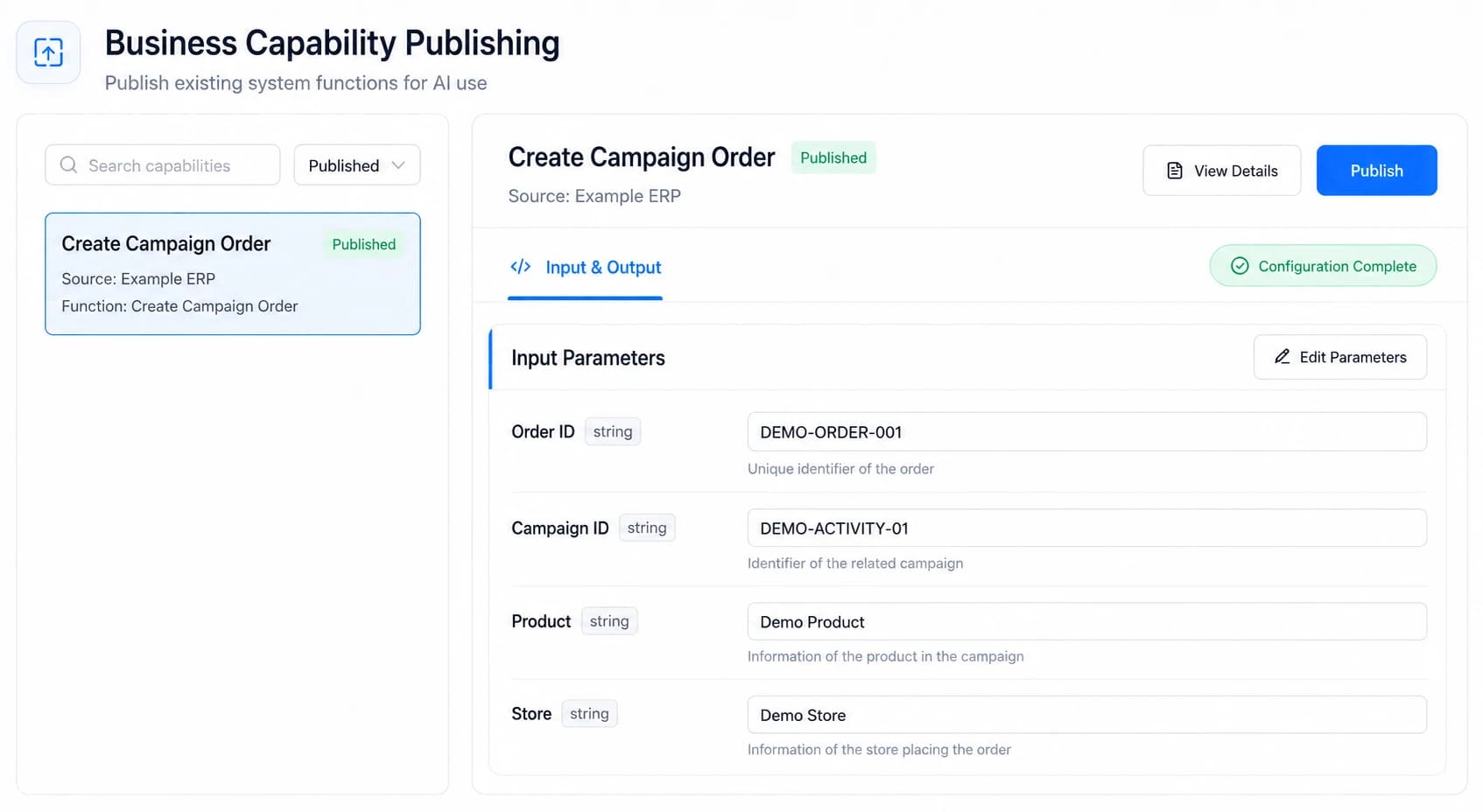
  • Input/output contract
  • Business semantics
  • Versioning & rollback
  • Employee / group / organization access
Nebula PLUS capability publishing interface showing contracts, business semantics, publication status and user authorization
BASED ON THE REAL PRODUCT · DEMO DATA

IDENTITY & ACCESS FLOW

Every Invocation Has a Known Employee and Access Scope

An AI user maps to a real employee, then reuses that employee’s functional and data access in the target system. The target system remains the final authority.

1AI User
2Employee Mapping
3Functional & Data Access
4Target System Execution
AI receives no access beyond the employee

MCP SERVICE & MULTI-ENTRY REUSE

Keep Existing APIs and Reuse One Connection Across AI Entry Points

A unified MCP service exposes published and authorized capabilities to WorkBuddy, DeepSeekHarness and standard MCP clients. Calls use the employee’s personal account and the target system makes the final access decision.

UNCHANGEDExisting APIs & Resources
NEBULA PLUSUnified MCP Service
WorkBuddyDeepSeekHarnessStandard MCP Client
Published capabilities onlyEmployee, group or organization authorizationFinal access decision by the target system

FIVE-STEP INTEGRATION PATH

Prove One Verifiable Scenario, Then Expand

Each step has a clear deliverable and acceptance point, avoiding broad system changes before the business goal is defined.

  1. 01

    Assess System Resources

    Confirm target systems, usable data, APIs and pages

  2. 02

    Define Business Semantics

    Specify inputs, outputs, field meaning and security boundaries

  3. 03

    Publish & Authorize

    Manage versions and rollback, then configure employee, group or organization access

  4. 04

    Connect an AI Entry

    Connect WorkBuddy, DeepSeekHarness or a standard MCP client

  5. 05

    Integrate & Accept

    Verify correct results, effective access, confirmation, traceable audit and exception handling

DEPLOYMENT & RESPONSIBILITIES

Business Systems Retain Final Truth and Execution Authority

Deploy on customer servers or private cloud, as dedicated single tenant, multi-tenant SaaS or hybrid, with internal/external network isolation. Domestic technology environments are adaptable subject to project assessment.

BUSINESS TRUTH & EXECUTION

Source Systems Own

  • Business truth and master data
  • Final access decisions
  • Transaction and workflow execution
CONNECTION & GOVERNANCE

Nebula PLUS Owns

  • Capability configuration and publishing
  • Employee identity connection
  • Authorization and invocation audit

A first business scenario can be completed in three days, with product training, implementation training and post-launch technical support

FAQ

Common Technical Evaluation Questions

Can a legacy system without complete APIs be connected?

We can assess read-only database queries, existing APIs and original business pages, starting with a clearly bounded capability rather than requiring every API upfront.

How do APIs relate to MCP?

APIs remain the business system’s technical interfaces. Nebula PLUS exposes published and authorized business capabilities to AI through a unified MCP service.

How is system authentication handled?

Custom authentication is supported and business calls use the employee’s personal account. AI receives no additional access beyond that account.

How is employee access inherited?

The AI user maps to a real employee. Invocations remain subject to functional access, data access and the target system’s final decision.

Is WorkBuddy supported?

Yes. Published and authorized capabilities can be used in WorkBuddy under the employee’s identity.

How can we obtain formal interface materials?

The public site does not expose endpoints, credentials or full request samples. Relevant materials are provided after the system scope and integration method are confirmed.

Bring One Real System and Scenario to the First Technical Evaluation

Align available resources, identity and access, network boundaries, the first capability and acceptance criteria.